Aurora, a purple gradient business card template.
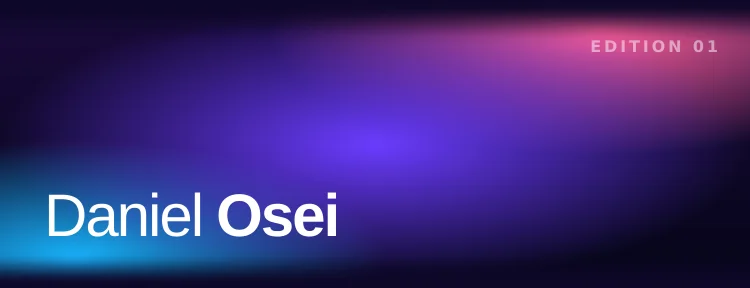
Aurora is a purple gradient business card template for Apple Wallet: deep indigo with pools of pink, violet and electric blue light, your name in white sans-serif and a small EDITION 01 mark in the corner. It is the loudest design in the set, and it is on Pro.
Pro design · Starts free in Oxford · Switch to Aurora on Pro
cardr.co/daniel-osei
What it is made of.
A base that runs from indigo (#1a0a3a) to almost black (#050518), lit by three overlapping glows: hot pink (#ff5e9c) at the top right, cyan-blue (#19b4ff) at the lower left and violet (#6a3cff) through the middle, with a fine grain over all of it. The name is in Helvetica Neue, white. EDITION 01 is printed small and tracked wide in the top corner.
#1a0a3a#050518#ff5e9c#19b4ff#6a3cff
- Plan
- Pro ($15 a month or $12 a month billed annually, with 7 days free)
- Wallet layout
- Artwork band (store card): your name is drawn into the art
- Name set in
- Helvetica Neue (sans-serif)
- Colors
-
#1a0a3a #050518 #ff5e9c #19b4ff #6a3cff - Pass colors
- Text
#ffffffon#0d0728 - From your name
- No: the design is the same for everyone who wears it
Who should wear Aurora.
Creators, musicians, DJs, people in tech and gaming, event crews: anyone who would rather be remembered than blend in. It photographs well and looks deliberate on a stage screen. It is a poor fit for a bank or a law firm; Dusk is the warmer, calmer gradient if you want color without the neon.
How it reads in a dim room.
For all its color, Aurora is a dark design: the white rows sit on a near-black indigo and measure well past 7:1. The glows sit in the artwork band, away from the text and the QR plate, so they do not wash anything out in a dark room.
19.5:1text contrast · 7:1 is the bar
Measured from the pass's own colors, by the WCAG contrast formula. 21:1 is black on white; the line marks 7:1, the bar for small text. This is a dark card.
Top to bottom, on the pass.
cardr.co/daniel-osei
- Name, in the art
- Role and company
- QR, opens your page
- Links, on the back
- Your name, in the artworkDrawn into the band across the top of the pass. A long name shrinks, then wraps, rather than being cut off.
- Your role and companyOne row under the band, in Apple's system font.
- Your phone numberTappable on your own phone.
- The QR codeOn the white plate Wallet draws at the bottom. It opens your page at cardr.co/yourname.
- The back of the passYour page link and every link you added.
The EDITION 01 mark takes the top right of the band, so the name keeps to the lower left, where the blue glow sits behind it.
Start free, wear Aurora on Pro.
Your card is made in Oxford first. Start Pro ($15 a month or $12 a month billed annually, with 7 days free) and switch to Aurora in your card's editor. What Pro includes.


Aurora, answered.
What does EDITION 01 mean on Aurora?
It is part of the design, the way a print run is marked. It is the same on every Aurora card.
Can I change the colors in Aurora?
No. For your own colors, Custom Gradient builds the card from any two you pick.
Is Aurora too bright to scan?
No. The QR code is drawn by Wallet on a white plate below the artwork, the same on every design, so the colors never touch it.
How do I get Aurora on my card?
Make your card free (it starts in Oxford), then start Pro and pick Aurora in your card's editor. Pro is $15 a month or $12 a month billed annually, with 7 days free. Your pass redraws itself in Wallet.
Start your card free today.
Free in Oxford today, and Aurora whenever you start Pro. Your details change any time without reissuing anything.