Apple Wallet strip, logo and thumbnail sizes Strip, thumbnail, background, and the rest.
Every image a Wallet pass can carry, at every scale, and which style actually displays it. The numbers are imported from the module our own pass builder is checked against, not copied by hand.
Apple Wallet pass images are sized in points and supplied at @1x, @2x and @3x. The strip is 375×144pt on store cards and coupons (1125×432px at @3x) and 375×98pt on event tickets; the thumbnail is 90×90pt; the background is 180×220pt and is blurred by Wallet; the logo’s allotment is 160×50pt; the icon is 29×29pt; the footer is 286×15pt. Which of them a pass can show depends on its style, and an image outside that set is silently ignored.
Every size, in points and pixels.
Multiply the point size by the scale: @2x is double, @3x is triple. A store-card strip at 375×144pt is 750×288px at @2x and 1125×432px at @3x.
Apple specifies each image as an allotted space in points. Supply each one at the three scales current iPhones use, named strip.png, strip@2x.png and strip@3x.png. Wallet picks the scale for the screen.
| Image | Allotted (points) | Pixels at @1x · @2x · @3x |
|---|---|---|
| strip.png — event ticket | 375×98pt | 375×98 · 750×196 · 1125×294 |
| strip.png — store card | 375×144pt | 375×144 · 750×288 · 1125×432 |
| strip.png — coupon | 375×144pt | 375×144 · 750×288 · 1125×432 |
| icon.png | 29×29pt | 29×29 · 58×58 · 87×87 |
| logo.png | 160×50pt | 160×50 · 320×100 · 480×150 |
| thumbnail.png | 90×90pt | 90×90 · 180×180 · 270×270 |
| footer.png | 286×15pt | 286×15 · 572×30 · 858×45 |
| background.png | 180×220pt | 180×220 · 360×440 · 540×660 |
Imported from src/pass-generator/pass-spec.js, which quotes Apple’s PassKit Package Format Reference beside every number.
“Allotted” is Apple’s word and it matters most for the logo: the 160×50pt is a maximum, and in Apple’s words “in most cases it should be narrower”. For the strip and background the allotment is the size to hit exactly; smaller is stretched, larger is scaled or cropped.
Drawn to one scale.
Side by side at the same scale, the strip is the only large sharp image a pass has. The background is bigger than the thumbnail but is blurred; the icon is almost nothing.
This is the one picture worth keeping in your head when designing a pass. If you want something to be seen, sharp, at a size people notice, it goes in the strip. Everything else is chrome.
Which style shows which image.
Each pass style displays a fixed set of images. A store card shows logo, icon and strip; a generic pass shows a thumbnail instead of a strip; an event ticket has two layouts that cannot be mixed.
| Style | Images Wallet displays |
|---|---|
| Generic | logo, icon, thumbnail |
| Store card | logo, icon, strip |
| Coupon | logo, icon, strip |
| Event ticket | strip layout: logo, icon, strip background layout: logo, icon, background, thumbnail |
| Boarding pass | logo, icon, footer |
Table 4-1 of Apple’s PassKit Package Format Reference, as encoded in pass-spec.js.
The trap is that nothing tells you when you get this wrong. Put a thumbnail.png in a store card and Wallet ignores it. It is still in the bundle, still hashed into manifest.json and still signed. We shipped exactly that mistake once, which is why our builder now reads this table from one module and fails the build on a mismatch.
The strip: the one big sharp image.
The strip runs the full width of the pass, 375pt, under the header. It is 144pt tall on store cards and coupons and 98pt on event tickets, and Wallet draws it sharp.
Wallet does no animation of any kind, so the strip is a still PNG. Anything text-like in it must survive being viewed small; the primary field is drawn over the strip on store cards, so leave room or leave the primary field empty and put the text in the artwork, which is what we do.
On an event ticket, Apple is explicit that the strip and the background are alternatives: “If you specify a strip image, do not specify a background image or a thumbnail.”
Thumbnail and background.
The thumbnail is 90×90pt and sharp, beside the primary field. The background is 180×220pt, covers the whole pass, and is blurred by Wallet.
- Thumbnail. Apple: the aspect ratio “should be in the range of 2:3 to 3:2, otherwise the image is cropped.” Wallet rounds the corners itself, so fill the square rather than drawing a circle inside it. It is the only slot sized for a face that stays recognisable.
- Background. Apple: “The image is cropped slightly on all sides and blurred.” Fine detail, hairlines and text vanish. What survives is large areas of colour, which is how to design for it. Put a scrim in the artwork if your text colour has to read over a photo.
- Footer. 286×15pt, boarding passes only, just above the barcode.
Exporting them without surprises.
Export every image as a PNG at exactly the pixel size for its scale, in sRGB, and keep the three scales pixel-aligned. A common cause of a soft-looking pass is a @3x file that is really an upscaled @1x.
- Design at @3x and export down. For a store-card strip that means a 1125×432px canvas, exported again at 750×288 and 375×144. Going the other way, upscaling a small original, is where soft passes come from.
- PNG only. Wallet reads PNG. A JPEG renamed to
.pngis not a PNG, and our viewer will say so. - Keep the strip’s important content away from the left. On a store card the primary field is drawn over the strip, bottom left. If you put a name or a mark there, Wallet’s text will sit on top of it.
- Mind the file size of the strip. A photographic @3x strip can run to hundreds of kilobytes, and the pass is downloaded over whatever signal the person has. Flat colour and line art compress far better than photographs.
- Name the files exactly.
strip@2x.png, notstrip-2x.pngorStrip@2x.PNG. Wallet looks for the exact names and ignores anything else without complaint. - Test on a device. Every mock-up, including ours, is a reproduction of Wallet’s own drawing. The phone is the ground truth.
Check yours before you ship it.
Open the pass in a viewer that checks sizes against these allotments. Ours runs in the browser and does not upload the file.
Our free .pkpass viewer opens any pass, lists every image with its real pixel size next to the allotment for its scale, and flags images the style cannot display, too many fields, and text Wallet will truncate. It checks against the same module this page is generated from.
For the rest of the format, including field limits and the behaviours Apple does not document, see the Apple Wallet pass guide. For the file itself, and why one sometimes refuses to open, see what a .pkpass file is.
Create my free cardCardr issues your business card as a signed Wallet pass, sized to all of this. Free.
Questions, answered.
What size is an Apple Wallet strip image?
375×144 points on store cards and coupons, which is 1125×432 pixels at @3x, and 375×98 points on event tickets.
What size is the Apple Wallet thumbnail?
90×90 points, so 270×270 pixels at @3x. Apple says its aspect ratio should be between 2:3 and 3:2 or it is cropped.
What size is the Apple Wallet background image?
180×220 points, 540×660 pixels at @3x. Wallet crops it slightly on all sides and blurs it.
What size is the Apple Wallet logo?
The allotted space is 160×50 points, and Apple says most logos should be narrower than that. The icon is 29×29 points.
Can a Wallet pass have an animated image?
No. Pass images are static PNGs. Wallet does not play GIF or APNG; it shows a still frame or nothing.
Can I use a strip and a thumbnail on the same pass?
Not on an event ticket, where Apple says to specify one or the other. A store card has no thumbnail slot at all; a generic pass has a thumbnail and no strip.
Keep reading
This is part of Apple Wallet business cards. Every other guide is on the guides index.
-
Add a business card to Apple Wallet
Five steps. The only catch is that Wallet will not take a photo or a PDF.
-
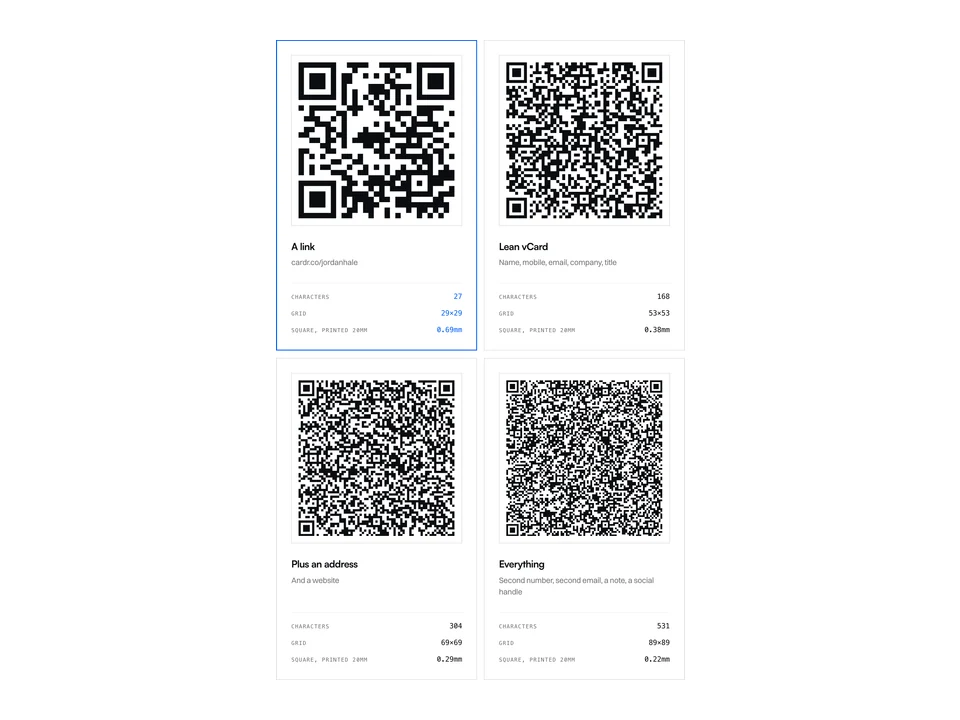
How to make a vCard QR code
The raw kind fails quietly. Here are four real codes showing exactly when.
-
Digital business cards on Android
The most common objection, answered straight rather than sold around.
Free forever. About a minute to build.
Nothing for the other person to install, and no card details to start.