Business card QR code size Count the squares, then measure.
A QR code has no minimum size in millimetres. It has a minimum size per square, and a number of squares that depends on what you put in it. Multiply the two and you have your answer.
Kai, Founder of Cardr · 7 min read
A QR code’s printed size is its module count times its module size, plus a four-module quiet zone on every side. Using GS1’s published minimum module of 0.396mm, a short link (29 modules across) can print as small as 11.5mm and needs 14.7mm of card with its margin. A lean vCard from the same encoder is 57 modules across, so its floor is 22.6mm, or 25.7mm with the margin. At GS1’s target module size those become 18.3mm and 32.2mm. There is no single right size; there is a right size for your code.
Why there is no one size in millimetres.
A QR code is a grid of black and white squares called modules. The more you encode, the more modules it needs across, so at any fixed printed size each module gets smaller.
Every “minimum QR size” you have read is a module count and a module size multiplied together, with one of them hidden. The module count comes from the version: version 1 is 21 modules across, and each version up adds four. Which version you get is decided by how many characters you encode and how much error correction you ask for.
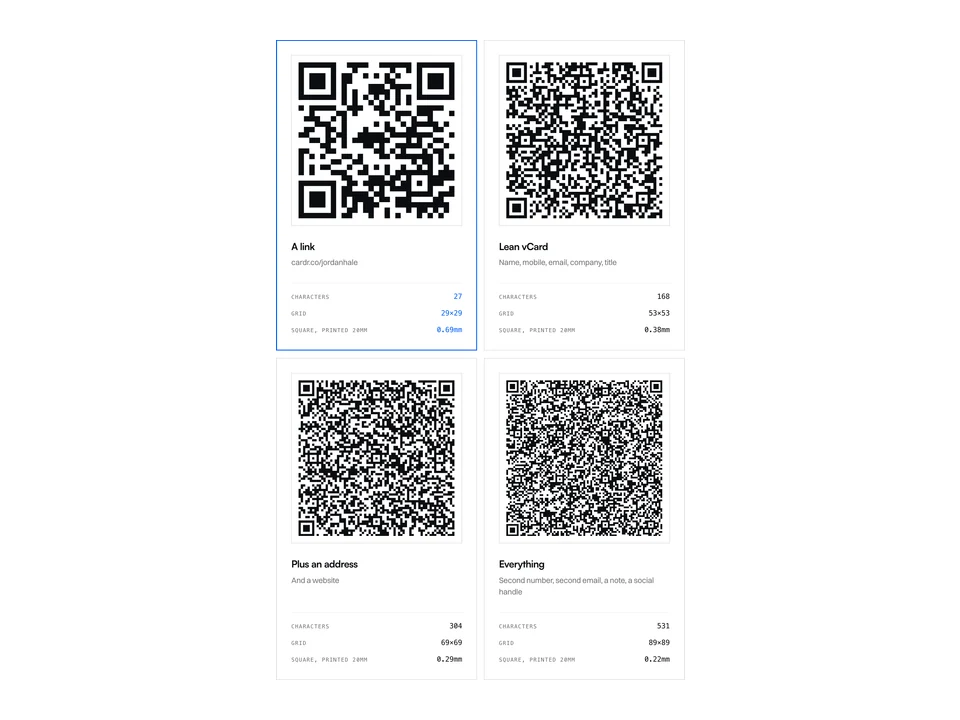
So the first question is not how big. It is what the code holds. Here is one made-up person encoded four ways by the same encoder our free generator uses.
-
A link cardr.co/jordanhale
- Characters
- 27
- Grid
- 29×29
- Square, printed 20mm
- 0.69mm
-
Lean vCard Name, mobile, email, company, title
- Characters
- 171
- Grid
- 53×53
- Square, printed 20mm
- 0.38mm
-
Plus an address And a website
- Characters
- 310
- Grid
- 69×69
- Square, printed 20mm
- 0.29mm
-
Everything Second number, second email, a note, a social handle
- Characters
- 540
- Grid
- 89×89
- Square, printed 20mm
- 0.22mm
A link stays small because it is short: the details live on the page it opens, not in the code. A vCard carries the contact itself, so every field you add grows the grid. The trade between the two is covered in our vCard QR guide and on QR code business cards. This page is about the size, once you have chosen.
The smallest a module should be.
The one published figure we could source is GS1’s: a module of at least 0.396mm, with 0.495mm as the target. Everything else on this page is multiplication.
GS1 is the standards body behind retail barcodes. Its specification sets the size of the module, which it calls the X-dimension, for QR codes on products: a minimum of 0.396mm, a target of 0.495mm and a maximum of 0.990mm, with a quiet zone four modules wide on every side. GS1 UK says these codes are meant to be read at the till and by phones, which is why we use them here.
Two honest caveats. First, GS1 wrote this for printed packaging, not for business cards, and nobody publishes a figure for “a phone at arm’s length in a dim room”. Second, the minimum is a floor, not a recommendation. Where you have the room, use the target.
You will also see much smaller numbers. Denso Wave, who invented the QR code, works an example at 0.254mm a module: that is what a 400dpi printer produces with four dots per module. It is a printer’s limit, not a phone’s, and it is not a size we would print a business card at.
Every code, measured.
Module count from the encoder, multiplied by GS1’s minimum and target module sizes, with and without the quiet zone. Calculated when this page is built, not typed in.
| What it encodes | Characters | Grid | Code at 0.396mm | With quiet zone | Code at 0.495mm | With quiet zone |
|---|---|---|---|---|---|---|
| A short link https://cardr.co/jordanhale |
27 | 29×29 (v3) | 11.5mm | 14.7mm | 14.4mm | 18.3mm |
| Lean vCard Name, company, title, mobile, email |
195 | 57×57 (v10) | 22.6mm | 25.7mm | 28.2mm | 32.2mm |
| Lean vCard + website The six fields our generator takes |
233 | 61×61 (v11) | 24.2mm | 27.3mm | 30.2mm | 34.2mm |
| Plus a work address One postal address added |
337 | 73×73 (v14) | 28.9mm | 32.1mm | 36.1mm | 40.1mm |
Grid sizes come from QRCode.create() in the qrcode package, the encoder behind our generator. The person and company are fictional. The quiet zone column adds four modules on each side, as Denso Wave and GS1 require.
Read across the lean vCard row. At the minimum module it needs 22.6mm of printed code. Print it 20mm wide instead, say, and each of its 57 modules is 0.35mm, below GS1’s floor. The same 20mm gives the link’s 29 modules 0.69mm each, comfortably above the target. That is the whole argument for putting a link on a small card and saving the vCard for a larger surface.
The quiet zone is part of the size.
Four modules of blank space on every side. Crop into it and a perfectly printed code can fail to scan.
Both Denso Wave and GS1 require a margin four modules wide on all sides, with nothing printed in it: no border, no text, no edge of the card. That adds eight modules to the width, which is why the table has two columns for each module size. On a 57-module vCard, the margin alone is 4.0mm at the target size.
Whatever generator you use, look at how much white border the download already has before you place it, and make up the difference to four modules in the layout. Designers trimming that white to line the code up with other elements is one of the easiest ways to break one.
Error correction costs you modules.
Higher error correction makes a code tolerate more damage, and makes it bigger. The same lean vCard is 49 modules across at level L and 73 at level H.
Denso Wave lists four levels: L restores about 7% of a damaged code, M about 15%, Q about 25% and H about 30%, and notes M is the one most often chosen. Our generator uses M. Here is what the choice does to the same contact:
- L: 49 modules, so 28.2mm with its margin at the target size.
- M: 57 modules, 32.2mm.
- Q: 65 modules, 36.1mm.
- H: 73 modules, 40.1mm.
A business card lives in a pocket, not a factory, so there is little reason to pay for H. On this contact, each level up costs 8 more modules across, on the same card.
Sizing yours, step by step.
Five steps, and the fourth is the one people skip.
-
01
Decide what the code holds
A short link or a vCard. This decides the module count, and the module count decides everything else.
-
02
Read the grid size off the generator
Count the modules across, or read the version: a version-3 code is 29 across, and each version up adds four. A lean vCard at level M came out at 57.
-
03
Multiply by the module size
Modules across times 0.495mm is GS1’s target; times 0.396mm is its minimum. Do not go below the minimum.
-
04
Add the quiet zone
Add four modules of blank space on every side, so eight modules to the width. That is the space the code really needs on the card.
-
05
Print a proof and scan it
On the stock you will use, with two or three different phones, from the distance people will actually hold them. Before you order the box of 500.
If you would rather the code on your card never needed reprinting, point it at a page instead. A Cardr card is a signed Apple Wallet pass whose QR opens your page at a short address, free, and you can change the details behind it after the card is printed.
Generate yours freeNo signup and no email. It shows the code as soon as you type, so you can see the grid before you print.
Questions, answered.
What is the minimum QR code size for a business card?
It depends on how many modules the code has. Using GS1’s minimum module size of 0.396mm, a short link code of 29 modules can be 11.5mm across (14.7mm including the quiet zone), and a lean vCard of 57 modules can be 22.6mm (25.7mm with the quiet zone). Those are floors; the target module size of 0.495mm is safer.
How big should the quiet zone around a QR code be?
Four modules on every side, with nothing printed in it. Both Denso Wave, who created the QR code, and GS1 specify it. On a code with 0.5mm modules that is 2mm of white on each side.
Is 2cm big enough for a QR code on a business card?
For a short link, yes: 29 modules across 20mm is 0.69mm per module, above GS1’s 0.495mm target. For a lean vCard, no: 57 modules across 20mm is 0.35mm per module, below GS1’s 0.396mm minimum. Encode less or print bigger.
Does a vCard QR code need to be bigger than a URL QR code?
Yes, because it has more modules. The link in our examples encodes to 29×29; a vCard with name, company, title, mobile and email encodes to 57×57 at the same error correction level. At the same module size, the vCard needs roughly twice the width.
How far away can a QR code be scanned?
We have no sourced figure for this and will not invent one. It depends on the module size, the phone’s camera, the light and the angle. The bigger each module is, the further away it reads, which is another reason to keep the module count low.
Which error correction level should I use?
M is the usual choice and is what our generator uses. L makes the grid smaller but tolerates less damage; Q and H tolerate more and make the grid bigger. For a card kept in a wallet or on a screen, M is a sensible balance.
Keep reading
This is part of QR codes and NFC on business cards. Every other guide is on the guides index.
-
NFC & QR6 min read
How to make a vCard QR code
The raw kind fails quietly. Here are four real codes showing exactly when.
-
NFC & QR5 min read
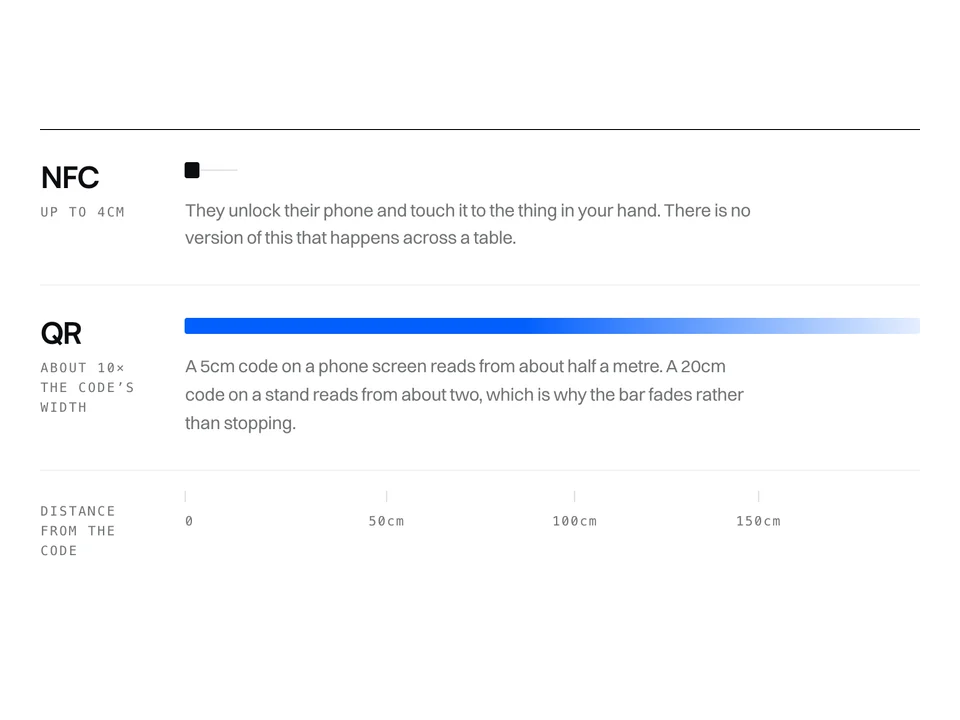
NFC vs QR for business cards
They fail in different places, and the distance between you decides which one matters.
-
Digital cards5 min read
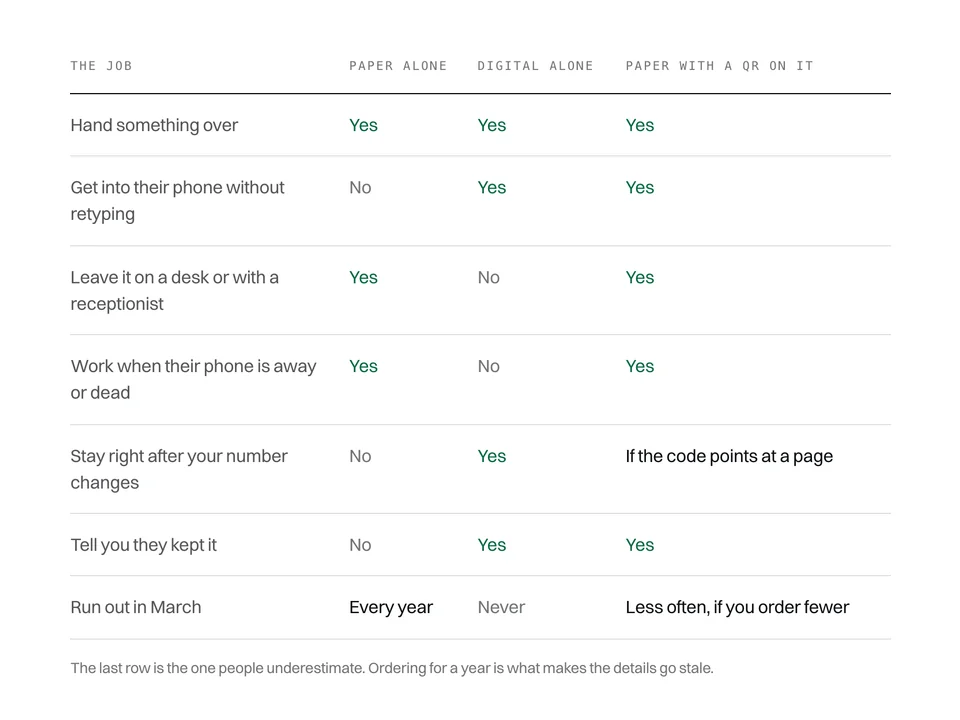
Are paper business cards dead?
No. And the places paper still wins are specific enough to name.
Free forever. About a minute to build.
Nothing for the other person to install, and no card details to start.